

Have you ever wondered why some websites consistently appear at the top of Google’s search results while others struggle to get noticed? The answer often lies in how well they’ve optimized their pages for search engines — a process known as on-page SEO. Partnering with trusted SEO experts can help you implement these strategies effectively.
Understanding the on-page SEO basics forms the foundation of every successful digital marketing strategy. It helps search engines recognize the value of your content and ensures that users find exactly what they’re looking for.
In this beginner-friendly guide, you’ll learn everything you need to know — from core principles and best practices to actionable steps — so you can start optimizing your pages confidently and improve your rankings effectively.
What Is On-Page SEO?
On-page SEO means optimizing each web page so search engines can clearly understand and rank it for the right keywords. It focuses on improving both your content and the supporting HTML elements. For a deeper explanation, check out this comprehensive on-page SEO guide from Moz.
Unlike off-page SEO, which involves backlinks and external signals, or technical SEO, which deals with site speed and performance, on-page SEO is fully under your control. It’s about refining your words, tags, and layout so both users and search engines can interpret your content easily.
When done correctly, on-page optimization helps search engines recognize your topic and match it with user intent. For instance, Google examines your keywords, headings, and content structure to determine relevance. By using clear headings, natural keyword placement, and strategic internal links, you make it easier for Google to understand and reward your page with better rankings.
Why On-Page SEO Matters for Beginners
For beginners, understanding why On-Page Optimization matters is essential. Even great content can fail to rank if it isn’t properly optimized. Search engines rely heavily on on-page elements to evaluate how relevant your page is to a user’s search.
Strong on-page SEO improves your website’s visibility, click-through rate, and ranking potential. When your titles, headings, and content align with search intent, Google is more likely to display your pages higher in results. As a result, you gain more organic traffic and stronger engagement.
In this beginner’s guide to on-page SEO, you’ll see how small, consistent optimizations — such as refining title tags, using descriptive URLs, and improving internal links — can create a big impact. These steps help both users and search engines understand your content, setting a strong foundation for long-term growth.
Key Elements of On-Page Optimization
Understanding the key elements of on-page SEO helps you create pages that search engines can easily interpret and that readers enjoy. Below are the essential components that form the foundation of effective on-page SEO basics, along with actionable tips.
1. Title Tags and Meta Descriptions
Your title tag and meta description are the first things both users and search engines see. Write clear, keyword-rich titles that reflect the page’s content.
-
Place your primary keyword early in the title.
-
For best results, keep titles concise—under 60 characters—and meta descriptions under 160.
-
Focus on clarity and value — not keyword stuffing.
Example:
✅ Optimized: “On-Page SEO Basics: How to Improve Your Website Rankings”
❌ Not optimized: “SEO SEO SEO | Ranking Tips Fast”
2. Header Tags (H1, H2, H3…)
Header tags organize your content and guide readers through your topic.
-
Use H1 for the main title (usually your post title).
-
Structure your content logically by using H2 tags for key sections and H3 tags for supporting points.
Proper structure improves readability and signals to search engines how your ideas connect.
3. Keyword Optimization
Keyword optimization means balancing relevance with readability.
-
Place your main keyword naturally in the introduction, headings, and key paragraphs.
-
Include LSI (latent semantic indexing) keywords — related terms that give context.
-
Avoid repetition; focus on flow.
For example, instead of repeating “on-page SEO” too often, include variations like “on-page SEO basics” or “how to do on-page SEO.”
Partnering with experts in custom keyword strategy can help you identify high-impact search terms and optimize your content more effectively.
4. Content Quality and Readability
High-quality, user-focused content drives better rankings. Keep sentences concise and use transition words to ensure smooth reading.
-
Maintain a friendly, conversational tone.
-
Balance depth with simplicity.
-
Naturally include “on-page SEO basics.”
Readable content keeps visitors engaged, signaling to Google that your content is valuable.
5. Internal Linking
Internal links connect your content and help both users and crawlers navigate easily.
-
Link to relevant posts and pages.
-
Opt for specific, keyword-rich anchor text instead of using common terms like ‘click here.
-
Spread links evenly to distribute authority across your site.
Effective internal linking strengthens your SEO foundation and enhances user experience.
6. Image Optimization
Images add value but can slow your site if not optimized.
-
Ensure each image has a descriptive file name and alt text that reflect relevant search terms.
-
Compress images to reduce size while maintaining quality.
-
Use formats like WebP for better performance.
Optimized visuals improve speed, accessibility, and engagement.
7. URL Structure
Your URL should be short, descriptive, and keyword-focused.
Example:
✅ Optimized: www.example.com/on-page-seo-basics
❌ Not optimized: www.example.com/page?id=12345
Clear URLs help both search engines and users identify your page topic at a glance.
8. Page Speed and Mobile Friendliness
Fast-loading, mobile-friendly pages are vital for SEO. With mobile-first indexing, Google prioritizes mobile versions for ranking. A responsive web design ensures your site performs well on all devices.
-
Test speed using Google PageSpeed Insights or GTmetrix.
-
Compress images, enable caching, and ensure responsive design.
A seamless mobile experience boosts engagement and builds trust.
How to Do On-Page SEO (Step-by-Step for Beginners)
If you’re new to optimization, this simple process will help you improve your website’s visibility.
1. Research Your Target Keyword
Start with keywords your audience searches for. Use Google Keyword Planner, Ubersuggest, or Ahrefs to find relevant terms. Choose one with solid volume and low competition.
Look for long-tail variations like “how to do on-page SEO” or “on-page SEO basics for beginners.” Understanding user intent ensures you attract the right visitors.
2. Optimize Your Title Tag and Meta Description
Use your keyword naturally in both the title and description.
Example:
-
Title: “Beginner’s Guide to On-Page SEO: How to Optimize Your Content”
-
Meta Description: “Master the fundamentals of on-page SEO by learning how to use keywords and organize content to enhance rankings.”
Unique, benefit-focused tags attract more clicks.
3. Structure Content with Headings
Use H2 and H3 tags to organize your ideas logically. Place your main keyword in at least one subheading.
Good structure enhances readability and helps search engines interpret your topic accurately.
4. Add Internal Links and Visuals
Internal links guide readers to related content and encourage engagement.
Add visuals like screenshots, charts, or infographics to clarify points. These make your article more appealing and keep users on the page longer — a positive ranking signal.
5. Check Page Speed and Mobile Usability
Run tests using PageSpeed Insights or Google’s Mobile-Friendly Test. Compress images, minify code, and select responsive themes.
Faster pages reduce bounce rates and improve both ranking and retention.
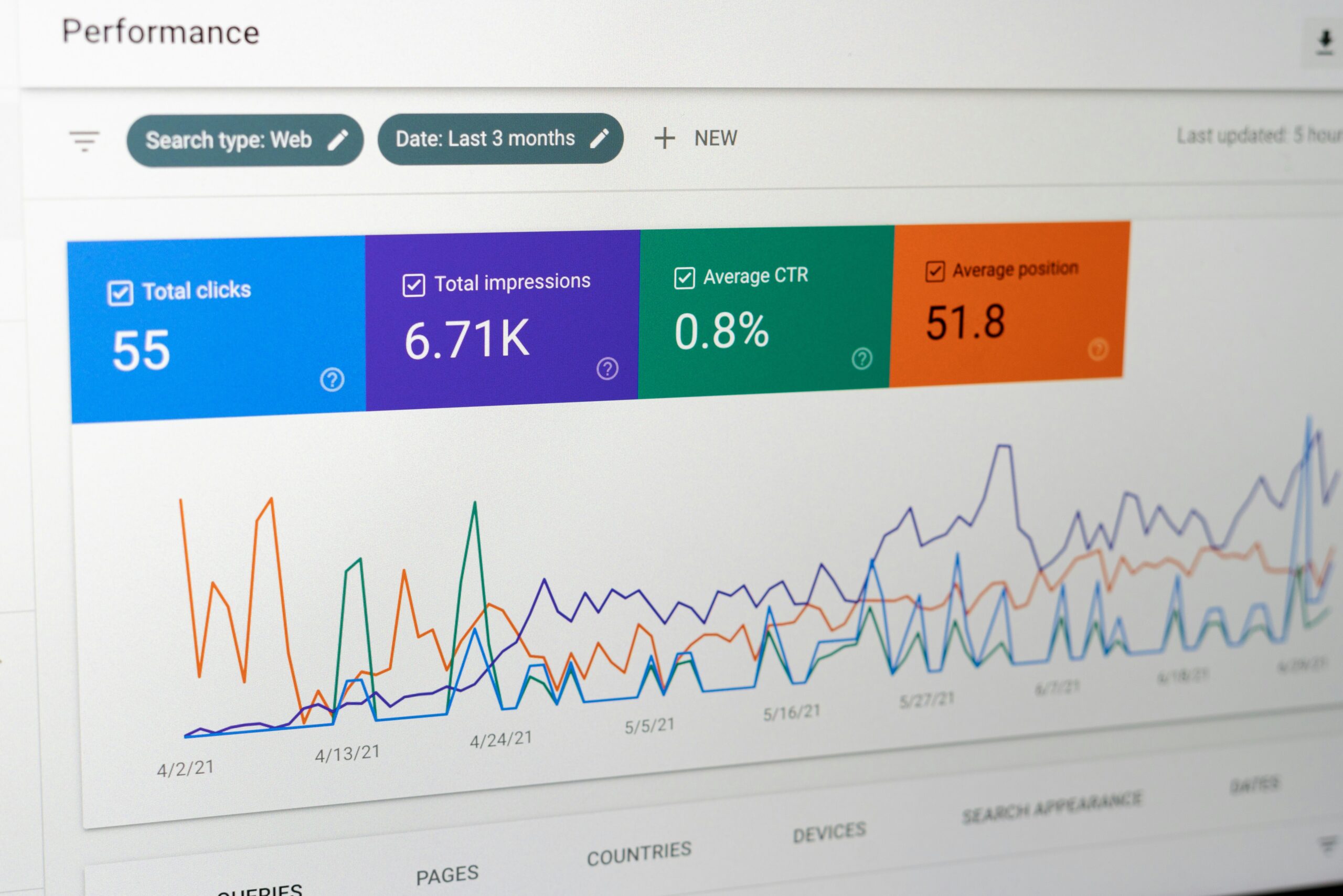
6. Monitor Results Using Google Search Console
After publishing, track your performance regularly.
-
Review impressions, clicks, and average position.
-
Identify your top-performing pages and areas for improvement.
-
Fix mobile usability or indexing issues promptly.
Continuous monitoring ensures long-term SEO growth.
Common On-Page SEO Mistakes to Avoid
Avoiding simple mistakes can save you from poor rankings:
-
Keyword stuffing: Overuse makes content sound unnatural.
-
Duplicate or thin content: Always offer unique value.
-
Missing title tags or meta descriptions: These influence visibility and clicks.
-
Unoptimized images: Add alt text and descriptive names.
-
Ignoring mobile usability: Always test your layout across devices.
By avoiding these pitfalls, your website becomes more search-friendly and user-focused.
Tools to Help You Improve On-Page SEO
The right tools simplify optimization and keep your site in top shape:
-
Google Search Console: Track performance and fix indexing issues.
-
Yoast SEO or Rank Math: Optimize metadata and content.
-
Screaming Frog: Identify broken links and missing tags.
-
PageSpeed Insights: Analyze load time and Core Web Vitals.
-
Grammarly or Hemingway: Refine grammar and readability.
Using these tools regularly helps you maintain consistent SEO quality.
How to Measure On-Pagew Optimization Success
Tracking results ensures your efforts pay off:
-
Rankings and traffic: Use Google Analytics to monitor progress.
-
Click-through rate (CTR): Reflects how appealing your titles are.
-
Bounce rate and dwell time: Longer sessions indicate engaging content.
-
Core Web Vitals: Measure speed, stability, and responsiveness.
Consistent analysis allows you to refine your strategy and stay competitive.
Final Thoughts — Start with On-Page SEO Basics
Mastering the on-page SEO basics is one of the smartest steps a beginner can take. It builds the foundation for lasting visibility, better engagement, and long-term success.
Start small — optimize your titles, enhance content quality, and ensure your site performs well on mobile. Over time, these improvements compound to create measurable growth.
CTA: Start optimizing your website with these on-page SEO basics to improve visibility and grow your organic traffic today.
H2: Frequently Asked Questions
1. What is on-page SEO in simple terms?
On-page SEO is the process of optimizing individual web pages — including content, titles, and HTML elements — so search engines can understand and rank them higher in results.
2. How is on-page SEO different from off-page SEO?
On-page SEO focuses on elements within your website, like keywords, headings, and meta tags. Off-page SEO, on the other hand, deals with external signals such as backlinks and brand mentions.
3. Why is on-page SEO important for beginners?
It helps search engines understand your content and improves visibility in search results. Without proper on-page optimization, even high-quality content may struggle to rank well.
4. What are The Core Elements You Need for Strong On-Page Optimization?
The main elements include title tags, headings, keyword placement, internal links, image optimization, and page speed. Together, they enhance user experience and search performance.